S2S APM Overview
This page describes the integration procedures for the Payment Platform used by e-commerce merchants.
APM Payment flow
The S2S APM payment flow is shown below.
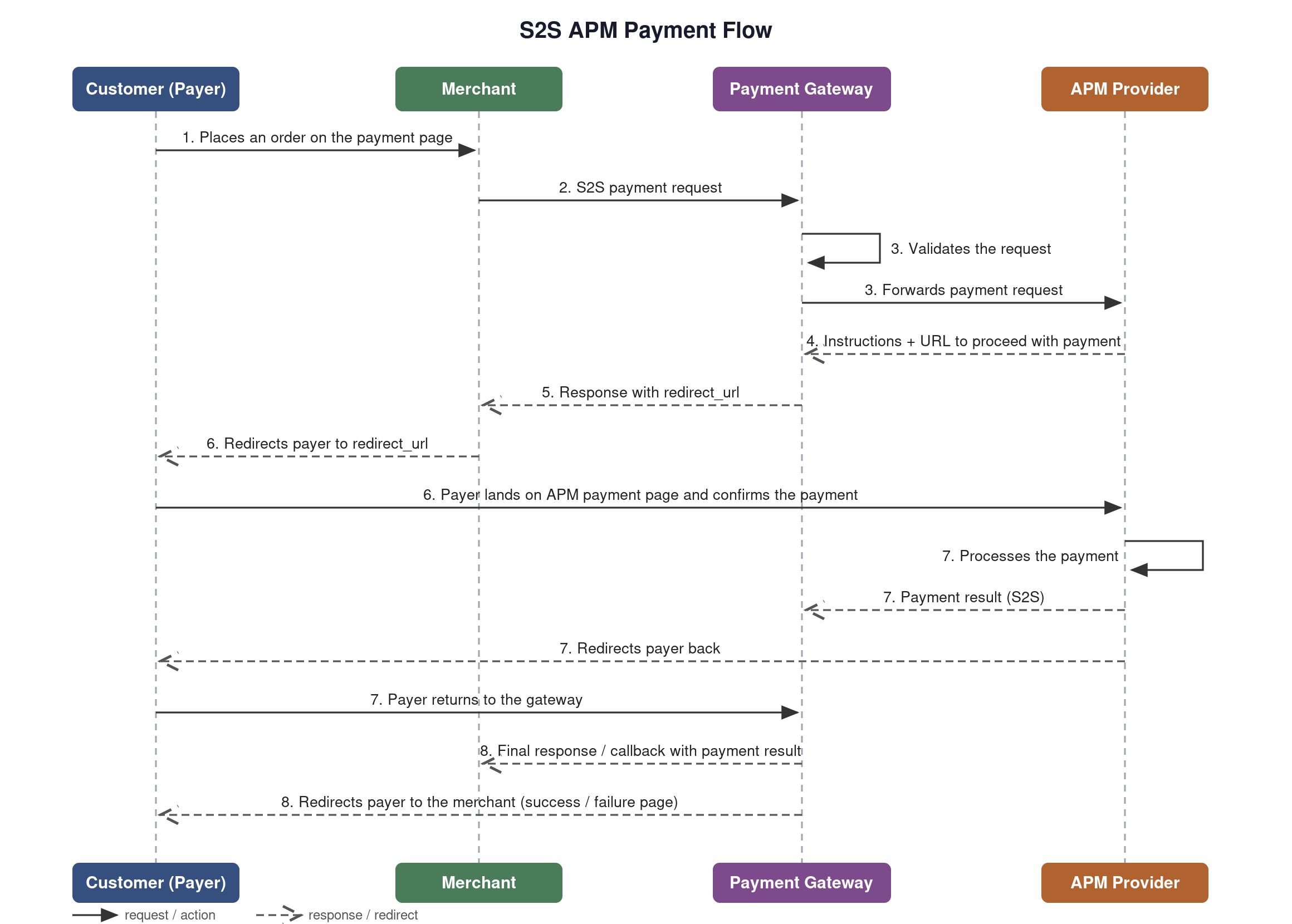
Integration process
The Payment Platform implements acquiring payments (purchases) using a specific API interaction.
Client Registration
Provide the following data to your account administrator in order to get an account and access the Payment Platform:
| Data | Description |
|---|---|
notification_url | URL which will be receiving the notifications of the processing results of your request to the Payment Platform |
| Contact e-mail | Merchant's contact email |
| IP List | List of your IP addresses, from which requests to the Payment Platform will be sent. |
tipReturn any HTTP
2xxstatus for everyPOSTrequest to your notification URL to confirm that you received the callback. The response body is not checked. Details: Callbacks.
Receive the following information from your administrator to begin working with the Payment Platform:
| Parameter | Description |
|---|---|
| CLIENT_KEY | Unique key to identify the account in the Payment Platform (used as request parameter). In the administration platform this parameter corresponds to the "Merchant key" field |
| PASSWORD | Password for Client authentication in the Payment Platform (used for calculating hash parameter). In the administration platform this parameter corresponds to the "Password" field |
| PAYMENT_URL | URL to request the Payment |
Redirects
There are two possible approaches for implementing the redirect when:
- The required method is
GET redirect_urlcontains query parameters such asredirect_url=https://example.domain.com/?parameter=1
Option 1 Redirect the customer by sending query parameters within the form inputs
Parse the query parameters from the redirect_url and pass them as input elements in an HTML
form:
Example:
<form action="https://example.domain.com" method="GET">
  <input name="parameter" value="1">
  <input type="submit" value="Go">
</form>
Option 2: Redirect Using JavaScript
Use JavaScript to redirect the customer to the specified redirect_url with the query parameters:
Example:
document.location = 'https://example.domain.com/?parameter=1';
Redirect with memory storage
When enabled in Configuration > Protocol Mappings, Payment Platform stores the redirect data server-side and returns a simple GET URL instead of a full set of redirect parameters. When the customer's browser follows that URL, Payment Platform's wrapper endpoint:
- Retrieves the stored redirect data from memory storage.
- Builds the required POST form automatically.
- Renders and submits the form to the destination (3DS page, alternative payment method provider, etc.).
Use this option when you want to minimize the merchant-side redirect implementation. Advantages:
- Minimal integration effort (no form-building logic on the merchant side).
- Improved security (sensitive redirect parameters are not exposed in the URL or page source).
- No URL length limits (large redirect payloads are stored server-side).
- Fewer integration errors (Payment Platform handles form encoding and submission).
Contact your account manager to enable memory storage redirects for your account.
URL blocking
Notification URLs may be temporarily blocked due to consistently receiving timeouts in response to the callback.
If callbacks to your notification URL time out five times within five minutes, the URL is blocked for your account for 15 minutes. The callbacks due during the block are not lost: they are sent later, as retries.
infoThe blocking automatically lifts after 15 minutes.
Details: URL blocking.
Protocol Mapping
Verifiy that your protocol mapping meets requirements before using the S2S integration. This is done via your Admin.
warningYou cannot make payments if the S2S APM protocol is not mapped.
Payment Platform Interaction
Send the server to server HTTPS POST request to the Payment Platform URL (PAYMENT_URL) in all transactions.
In response, the Payment Platform will return the JSON encoded string.
Transactions requests
S2s APM Transaction Requests
Possible actions
When you make request to the Payment Platform, you need to specify action that needs to be done. Possible actions are:
| Action | Description |
|---|---|
| SALE | Creates a SALE transaction |
| CAPTURE | Captures the funds held by a SALE sent with auth=Y, or by any SALE on a MID with two-stage mode |
| CREDITVOID | Creates a REFUND or REVERSAL transaction, depending on the payment status. See Credit2Void |
| VOID | Creates a VOID transaction |
| CREDIT2VIRTUAL | Creates a CREDIT2VIRTUAL transaction |
| CREDIT2CRYPTO | Creates a CREDIT transaction |
| DEBIT2VIRTUAL | Creates a DEBIT transaction as a part of transfer flow |
| DEBIT2VIRTUAL_CALC | Calculates the amount and commission for a DEBIT2VIRTUAL before it is confirmed |
| DEBIT2VIRTUAL_COMPLETE | Confirms a DEBIT2VIRTUAL that was prepared with DEBIT2VIRTUAL_CALC |
| GET_TRANS_STATUS | Gets the status of a transaction in the Payment Platform |
Two-stage payments (DMS)
By default a SALE captures the funds immediately. To split the payment into an authorization and a
separate capture, send SALE with the optional auth=Y parameter.
- Authorize. Send
SALEwithauth=Y. The funds are held, not captured, and the transaction stays inPENDINGstatus until you capture or release it. - Capture. Send
CAPTUREwith thetrans_idof the authorization to transfer the held funds. Sign the request with the Capture signature. See the CAPTURE request page for the parameters. - Release. To cancel an authorization that was not captured, send
CREDITVOID.
Send exactly Y in auth: any other value is processed as an immediate SALE.
Two-stage mode can also be enabled on the MID by Payment Platform. On such a MID a SALE creates a
hold even when auth is not sent. Depending on the MID setup, the funds are captured automatically right
after the authorization or on a schedule, or they stay held until the payment is captured. You can send
CAPTURE yourself while the payment is in PENDING status. Until the capture, the
payment is in PENDING status, and CREDITVOID releases the hold instead of refunding it.
Availability. Two-stage payments depend on the connector supporting the mode. They are implemented
for the wallet brands applepay and googlepay. Confirm availability for any other brand before
using auth=Y.
Do not use VOID to release a held authorization. VOID applies to payments in SETTLED status
only and returns Void is not allowed. for an authorization that has not been captured.
Possible transaction results and statuses
Result - value that system returns on request.
| Result | Description |
|---|---|
| SUCCESS | Action was successfully completed in the Payment Platform |
| DECLINED | Result of unsuccessful action in the Payment Platform |
| REDIRECT | Additional action required from requester |
| ACCEPTED | Action was accepted by the Payment Platform, but will be completed later |
| INIT | Additional action required from customer, final status will be sent in callback |
| UNDEFINED | The outcome of the action is not yet known; the final status arrives in the callback |
| WAITING | The refund was accepted and is waiting to be processed. Returned by CREDITVOID only |
| ERROR | Request has errors and was not validated by the Payment Platform |
Status - actual status of transaction in the Payment Platform.
| Status | Description | Final |
|---|---|---|
| PREPARE | Status is undetermined, final status will be sent in callback | no |
| 3DS | The payer is being authenticated; the final status arrives in the callback | no |
| REDIRECT | The transaction awaits SALE | no |
| PENDING | The payment has been initiated and additional actions are required from customer, or the funds are held and waiting for capture | no |
| SETTLED | Successful transaction | yes |
| VOID | Transaction for which void was made | yes |
| REFUND | Transaction for which refund was made | yes |
| REVERSAL | Transaction for which the held funds were released | yes |
| DECLINED | Not successful transaction | yes |
| CHARGEBACK | Transaction for which chargeback was made | yes |
SETTLED, VOID, REFUND, REVERSAL, CHARGEBACK, and DECLINED are final: processing is complete and the status will not change on its own. PREPARE, REDIRECT, and 3DS are intermediary: the transaction is still in progress, and the final status arrives in the callback. PENDING is intermediary too, but when the funds are held for a two-stage payment, the status changes only when the payment is captured or released (see Two-stage payments). Rely on the callback as the source of truth.
Callback Events
Callbacks are sent as a POST with the content type application/x-www-form-urlencoded.
After creating a transaction, you will receive callbacks carrying the result values below. The status field of a callback uses the Status values from the table above.
| Action | Callback result |
|---|---|
SALE | SUCCESS, DECLINED, REDIRECT, UNDEFINED |
CAPTURE, VOID | SUCCESS, DECLINED, UNDEFINED |
CREDITVOID | SUCCESS, DECLINED, WAITING, UNDEFINED |
DEBIT2VIRTUAL, CREDIT2VIRTUAL | SUCCESS, DECLINED, REDIRECT, UNDEFINED |
DEBIT2VIRTUAL_CALC | SUCCESS, with status = PREPARE |
CREDIT2CRYPTO | SUCCESS, DECLINED, REDIRECT, INIT, UNDEFINED |
CHARGEBACK | SUCCESS. Sent only for a successful chargeback |
Delivery, retries and hash verification: Callbacks. Every callback parameter: S2S APM callback parameters.
Postman collection
Download the collection file below, then import it in Postman: File > Import > Upload Files and select the downloaded .json file.
Errors
In case error you get synchronous response from the Payment Platform:
| Parameter | Description |
|---|---|
result | ERROR |
error_message | Error message |
Testing
You can make test requests using data below. Please note, that all transactions will be processed using Test engine.
| Customer's email | Testing / Result |
|---|---|
[email protected] | Email for testing successful sales. Response on successful SALE request: {action: SALE, result: SUCCESS, status: SETTLED} |
[email protected] | Email for testing unsuccessful sales. Response on unsuccessful SALE request: {action: SALE, result: DECLINED, status: DECLINED} |