Hosted payment fields
info
- Version: 1.0.0
- Released: 2025/12/17
Hosted Payment Fields provide an optimal balance between security, customization flexibility, and ease of payment page integration.
This integration method does not require PCI DSS Level 1 certification, as all sensitive payment data is processed and stored on our platform.
Checkout workflow (steps to perform) is shown below.
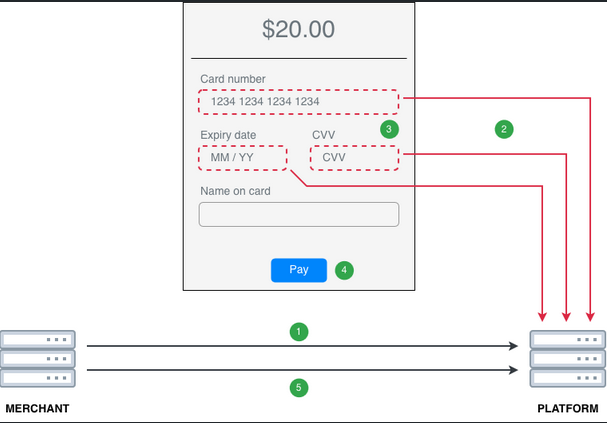
- Perform a server-to-server request to URL
{{CHECKOUT_HOST}}/api/v1/session/tokento obtain a session token. For the full parameter list, see the Session Token Request reference.
Hosted Payment Fields support the purchase and debit operations. Set operation in this request to the one you need, and in step 6 submit the payment to the endpoint that matches it.
warningMandatory Requirement: For Hosted Payment Fields, the
return_urlparameter must be added to ensure correct redirection after 3DS. Thesuccess_urlandcancel_urlparameters are optional for this integration.
customer_ip)With Hosted Payment Fields both the session-token request and the payment request are sent from your backend, so by default the platform records your server's IP as the payer IP.
To avoid this, send the payer's real IP address in the session-token request (POST /api/v1/session/token) as customer.ip, the ip field of the customer object:
"customer": {
  "name": "John Doe",
  "email": "[email protected]",
  "ip": "23.129.64.182"
}
The platform stores this value and uses it when sending the transaction to the connector and in the callback, where it is returned as customer_ip.
If customer.ip is not sent, behaviour is unchanged: the platform uses the IP of whichever system called /api/v1/session/token, which is your backend and not the payer's browser. A connector that compares the payer IP with the card's issuing country may then see a mismatch and decline the transaction.
Response Example (success)
{"token": "ZXlKMGVYQWlPaUpLVjFRaUxDSmhiR2NpT2lKU1V6STFOaUo5LmV5SnBZWFFpT2pFM05UUTVNak0yTlRJc0ltcDBhU0k2SWpGak9XSXpaamRsTFRjMll6SXRNVEZtTUMwNE9EZGtMVGhoTm1SaE1qWmtNVGhpTUNJc0ltVjRjQ0k2TVRjMU5Ea3lOekkxTW4wLlZ5aUc3ZVJ1dWdlYzk1cnM5OG5HRGhrSGJXdGxuU3BJdFc5aGhNNGlac3BKUi1maHZWWWVJeEc5OUxBcnEtR1BqTnR0RDJNRVFUN2dWRU0tQ2VIOE1aelpKR3VKN0R3cEptaUg0ODAtOW9RLU9UV2ZwUHZzQWFUSmRWZkw2Ui1nUkhadlRmMDc2YXlVWlhoTDF6U0tLYWdaOW5adkFlSHJTZE82OWFtNDkxbl9LVlpNTjRYUW5IWlV0dFJKNzBTdmpsbEpaaW04ZUZKQWE5NTZzQ08zSWtTbWlLcHlOTE52S0d4WHBBcVYtQ0g5M25vYzBJcnduc2U2aE9HLVRnbVlaV3RXeWlCZGFLa0psRWxKY0tVLWZ5VWduQmhsQWx6aVhBejRFS1ZnLXZTdHQ3WWk5ZmhYd1ctNm1BRGJtbmgxYjdlVURDclJMMmkzSHhLd0NiTXZrSE9BMFpyRjE5cGJoLXZzSnhNa05ydUNZRi02NHJRRVZYc2hJdEhhMnVWQnJUWTlZYmFUbWdRaENEanJxZWtQVEhfM0tKQV9FUExBU01yT19GeTBZcmRkajZBVGpROXUwWWZHVkpaV2p3UzVvRWwxQlZzUHNEZERncUlrWXdoSXQtbTFIcndlcXROYVNsTUtoVXQ5azE4SVlJbzZjc2oycU1acXFtQ2VURHBwMXZsXzk2VnBwc2xGLVdXdnUxRWd6X3BscVF0NzVkQVBvZWV1YXFyQ3pKT0NVRGIzdWVmbElQN3ZhTEFNekw2dEgzWUZycjZsRlhfbmNtYVhNRXpib2k1ejEtVmoyY0YzOEE2YV9MM041WllCcFBaTGJVaUFuTHh1M1Q2cWhSVEhjV1NpUTZZMFQ4WndUNkVjRWFvaEI1WVJqSFo3NGNkWC00UTVaR3AwT2Jj"}
If the payer later switches to a different payment plan, for example an installment plan, you can change the amount and other session parameters without creating a new session. For details, see Update session parameters.
- Integrate the HostedFields JavaScript library into your payment page and initialize the
HostedFields()object, specifying the HTML element identifiers for card data input fields.
Example
<script src="https://{{CHECKOUT_HOST}}/sdk/hosted-fields.js"></script>

<script>

const token = "{{session_token}}";
const config = {
    sessionToken: token,
    fields: {
        card: {
            id: "card-container", //identifier of container for rendering iframe with card number input
            placeholder: "Сard number",
            style: { //styles for this particular input
                input: {
                    color: "red",
                },
                "::placeholder": {
                    "font-size": "1rem",
                    color: "blue",
                },
                ".hosted-field-card-brand-logo": {
                    border: "1px solid silver",
                }
            },
        },
        expiry: {
            id: "expiry-container",
            placeholder: "Expiry"
        },
        cvv: {
            id: "cvv-container",
            placeholder: "CVV"
        }
    },
    style: { //general style for all these inputs
        input: {
            "font-size": "1rem",
        },
        "::placeholder": {
            "font-size": "1rem",
            color: "#777",
            "font-style": "italic"
        }
    }
};

var hostedFields = new HostedFields();

hostedFields.init(config);

</script>
- Option to enable additional verification.
The SDK provides a function called onSubmitResult.
This function is triggered after we save card data in the database. Based on its result, it is possible to determine whether a payment can be initiated safely.
For example:
{
  "result": "success",
  "message": ""
}
This serves as an indicator that the card data has been successfully saved in the database and that a payment can be initiated.
A possible response from the backend could be as follows:
{
  "result": "undefined",
  "message": ""
}
A result of undefined indicates that there is a formatting error in the data.
Example of function usage:
hostedFields.onSubmitResult = function (data) {
    if (data.result === "success") {
        some logic here ...
    }
};
This function is not mandatory, but it is recommended to use it in order to know when a payment can be safely initiated.
- (Optional) Use the listeners mechanism to handle input validation errors in the card data fields. Library allows to use listeners for 3 types of events: focus, input and blur. Input event also contains a validation result that can be used for different purposes
hostedFields.cardOn.input = function(data) {
    if (!data.valid) {
        document.querySelector("#card-container").classList.add("input-invalid");
    } else {
        document.querySelector("#card-container").classList.remove("input-invalid");
    }
};
hostedFields.cardOn.focus = function() {
    some code here...
};
hostedFields.cardOn.blur = function() {
    some code here...
};
-
Once the customer has entered their card details, call the
hostedFields.collectIframesData()method. -
Send an HTTP request to process the payment.
Request endpoint must match the operation of the session created in step 1:
Session operation | Request endpoint |
|---|---|
purchase | {{CHECKOUT_HOST}}/api/v1/processing/purchase/card |
debit | {{CHECKOUT_HOST}}/api/v1/processing/debit/card |
Request Headers: Token: {{session_token}}
The request parameters below are the same for both operations. For the full parameter list, see the Payment Request (purchase) and Payment Request (debit) references.
Payment Request Parameters
| Parameter | Type | Mandatory, Limitations | Description |
|---|---|---|---|
name | String | Required | Example: JOHN DOE |
with_hosted_fields | Bool | Required | Example: true |
billing_address | object | Optional | Example: “billing_address”: {“country”:”US”, “state”:”SA”, “city”:”Hong Kong”, “address”:”Moor Building 35274 State ST Fremont. U.S.A”, “zip”:”94538”, “phone”:”+14035555555”, “district”:”Brentwood”, “house_number”:”123”} |
browser_info | object | Optional | Example: “browser_info”: {“color_depth”:”24”, “java_enabled”:”false”, “java_script_enabled”:”true”, “language”:”en-US”, “screen_height”:”1600”, “screen_width”:”2560”, “time_zone_offset”:”-180”, “user_agent”:”Mozilla/5.0 (Macintosh; Intel Mac OS X 14.4; rv:125.0) Gecko/20100101 Firefox/125.0”, “platform”:”Linux x86_64”, “accept_header”:”*/*”} |
email | String | Optional | Example: [email protected] |
birth_date | String | Optional | Example: 1970-02-17 |
selected_language | String | Optional | Example: en |
accept_header in browser_infoThe browser_info object is optional in general, but its accept_header field is required by the MPGS connector — an empty value returns an INVALID_REQUEST error. In practice, browser_info becomes mandatory whenever the payment routes to a connector that requires accept_header.
accept_header carries the HTTP Accept header. Source it from the incoming Accept header of the shopper's request to your server — do not hardcode the */* shown in the example.
Payment Response Parameters
| Parameter | Type | Description |
|---|---|---|
result | String | Possible values: • success: transaction is successfully completed • decline: transaction is declined • redirect: redirect is required • waiting: transaction is being processed • undefined: uncertain payment status due to some problems |
redirect_url | String | If result = redirect, this parameter contains the URL to which the customer must be redirected. |
redirect_params | Array | If this parameter is returned, the redirect must be performed using the POST method; otherwise, the redirect should be executed using the GET method. |
decline_message | String | If result = decline, this parameter contains the decline message. |
public_id | String | The unique identifier of the payment. |
Callback to Merchant has the same structure as for usual Checkout Integration - please see CHECKOUT -> Integration Flow -> Callback Notification section.
Update session parameters
After you create the session, the payer might change something that affects the payment, for example switch from a one-time payment to an installment plan. In that case, update the session instead of creating a new one. The card details the payer has already entered stay in the hosted fields, and you do not need to call hostedFields.init() again. The session token and its expiration time do not change.
Send a server-to-server PUT request to {{CHECKOUT_HOST}}/api/v1/session/update before step 6. For the full description, see the Update Session Request reference.
Request Headers: Token: {{session_token}}
Do not send merchant_key or hash. Like any parameter not listed below, they are rejected.
| Parameter | Type | Description |
|---|---|---|
order_amount | String | New order amount. Replaces order.amount of the session and uses the same format. |
order_currency | String | New currency, ISO 4217 code. Replaces order.currency of the session. |
recurring_init | Bool | Set to true to initialize the transaction with possible following recurring payments. Send a JSON boolean: Y and N are rejected. |
req_token | Bool | Set to true to tokenize the card for further payments. Send a JSON boolean: Y and N are rejected. |
schedule_id | String | Schedule ID for recurring payments. Available when recurring_init is true. Not available for the debit operation. Send null to remove a schedule set earlier. |
parameters | Object | Extra parameters for the payment method, grouped by method. For Hosted Payment Fields, put them under card. |
custom_data | Object | Arbitrary data, which will be returned in the callback. |
- Send at least one parameter. Parameters you do not send keep their current values.
parametersandcustom_datareplace the stored object entirely. Send{}to clear one of them.- Any other parameter is rejected with the error
Parameter "<name>" can not be updated., for exampleParameter "order" can not be updated.Send the amount and currency asorder_amountandorder_currency, not in theorderobject. - When you change
order_amountororder_currency, the whole session is checked again: the amount must match the format of the currency, and the available payment methods are selected again. If no payment method is available for the new amount or currency, the request fails with the errorNot found acceptable methods. - Once a payment is created with the request from step 6, the session can no longer be updated, even if the payment is declined. The request then returns the error
Session can not be updated.
Request Example
{
  "order_amount": "33.30",
  "recurring_init": true,
  "schedule_id": "57fddecf-17b9-4d38-9320-a670f0c29ec0",
  "custom_data": {
    "method": "3_installments"
  }
}
Response Example (success)
{
  "result": "success"
}
If the request is invalid, the response has HTTP status 400. For the error format, see Errors and validation. A missing, invalid or expired Token returns HTTP status 403 with an HTML page instead of a JSON error.